Schema-Based Testing Docker Reference  

This reference covers everything that ships with the Schema-Based Testing Docker container: the three ways to invoke it, environment variables, command-line flags, success criteria for CI/CD pipelines, report formats, request/response logs, mTLS, and policy management. For a guided first run, see Setup.
How runs are configured
Schema-Based Testing always runs the same way — as a Docker container on your side that uses a Postman collection as the test basis, authenticates to Wallarm Cloud with a token, and reports results to Test runs and Security Issues (see details).
What differs is how you provide the run parameters to the container:
-
From a test policy: you create a test policy in Wallarm Console; it stores the collection, environment file(s), and selected scan modes and strategies, and produces a Docker command linked to the policy.
-
Locally: you build the Docker command yourself, passing the collection and other parameters as flags. The Wallarm Console wizard described in Running without test policy can compose this command for you.
-
Mixed: you start from a policy's Docker command, but override individual parameters at run time (for example, point to a local collection file instead of the one stored in the policy). Anything not overridden is taken from the policy.
Requirements
The Docker container needs network connectivity:
-
To the API being tested.
-
To the Wallarm Cloud (US, EU, or ME):
Wallarm Cloud IP addresses
To provide Wallarm Cloud access to your system, you may need a list of its public IP addresses:
Running with a test policy
Once a test policy is created, it provides a Docker run command that starts security testing for your application:
-
Go to Wallarm Console → Security Testing → Schema-Based → Test policies.
-
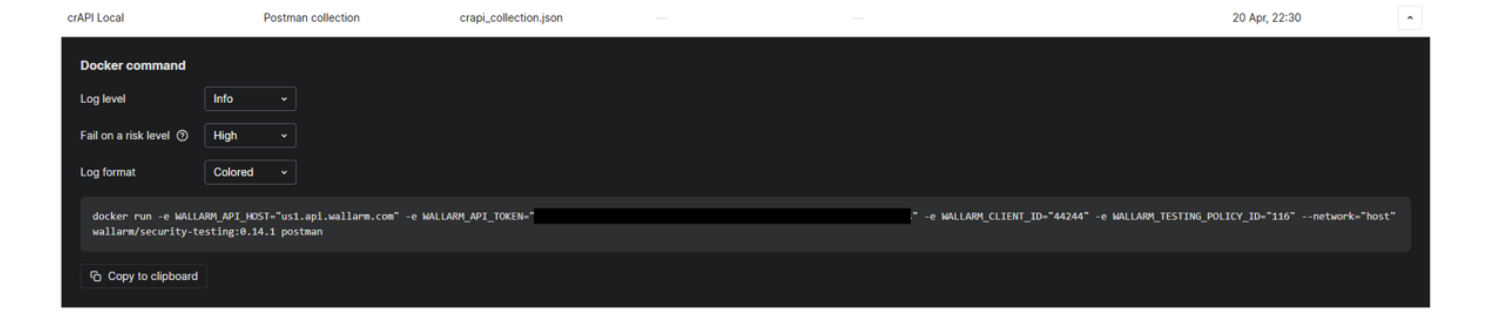
Click your policy. The policy's Docker command is displayed.
-
If necessary, redefine the Docker log level and format, and the test run success criteria. These additions add extra variables to the command.
-
Copy the command and run it, locally or from a CI/CD pipeline, on a machine that can reach the target application.
Running without test policy
With a token, you can build the Docker run command yourself, defining all parameters locally. You can still use the Wallarm Console wizard to compose the command.
To use the wizard:
-
Go to Security Testing → Schema-Based and click Generate test run command.
-
Select the parameters; the wizard composes the Docker run command accordingly:
- Log level —
Info(default),Debug,Warn,Error. - Log format —
Colored(default),JSON,Text. - Fail on risk level —
High(default),Critical,Medium,Low,Info. See Test run success criteria.
- Log level —
-
Copy the command.
-
Replace the placeholders with actual values.
-
Run the command on a machine that can reach the target application.
If the wizard is left at default values, it does not add anything beyond the required environment variables to the Docker command.
Mixed: overriding policy parameters
You can start from a policy's Docker command and override any parameter at run time — for example, use a local collection file instead of the one attached to the policy. Anything not overridden is taken from the policy.
For overriding mechanics, see the Docker --help output and the Configuration priority line: CLI flags > environment variables > test policy > defaults.
Environment variables
When you create and save a test policy in Wallarm, the resulting Docker run command includes all required -e variables and their values. The variables tell the Docker container which Wallarm Cloud account to connect to and which test policy to use as the basis for testing:
| Environment variable | Description | Required |
|---|---|---|
WALLARM_API_HOST |
Wallarm API server:
|
Yes |
WALLARM_API_TOKEN |
Wallarm Schema-Based Testing agent API token. See details here. |
Yes |
WALLARM_CLIENT_ID |
Numeric identifier of your Wallarm client account. The Console embeds it automatically when copying the command. | Yes |
WALLARM_TESTING_POLICY_ID |
ID of the test policy containing the test configuration. Required for runs linked to a policy. | Conditional |
FAIL_SEVERITY |
Defines test run success criteria for runs that are part of a CI/CD pipeline. | No |
Available flags
You can use flags to modify the behavior of Schema-Based Testing running as a Docker container. To see the full list of available flags, use:
The output looks like this:
Run Postman security testing workflow.

This command performs automated API security testing using Postman collections,
executing comprehensive security tests against the target API and reporting vulnerabilities.

OPERATING MODES:

Standalone Mode:
    Use local Postman collection without Wallarm platform integration.
    Requires: --postman-collection-file flag

    Example:
    docker run -v "$(pwd)/collection.json:/app/collection.json" \
        -e WALLARM_API_HOST="https://api.wallarm.com" \
        -e WALLARM_API_TOKEN="..." \
        wallarm/security-testing:v0.14.1 postman \
        --postman-collection-file /app/collection.json

Cloud Mode:
    Integrate with Wallarm platform using Test Policy.
    Requires: WALLARM_TESTING_POLICY_ID environment variable or --testing-policy-id flag

    Example (with local files override):
    docker run -v "$(pwd)/collection.json:/app/collection.json" \
        -v "$(pwd)/env.json:/app/env.json" \
        -e WALLARM_API_HOST="..." \
        -e WALLARM_API_TOKEN="..." \
        -e WALLARM_TESTING_POLICY_ID="..." \
        wallarm/security-testing:v0.14.1 postman \
        --postman-collection-file /app/collection.json \
        --postman-environment-files /app/env.json

    Example (uses collection from Test Policy):
    docker run \
        -e WALLARM_API_HOST="..." \
        -e WALLARM_API_TOKEN="..." \
        -e WALLARM_TESTING_POLICY_ID="..." \
        wallarm/security-testing:v0.14.1 postman

Configuration priority: CLI flags > Environment variables > Test Policy > Defaults

Usage:
security-testing postman [flags]

Flags:
-h, --help                        help for postman
--postman-collection-file string  Path to local Postman collection file (JSON)
--postman-environment-files stringSlice
                                  Path(s) to Postman environment file(s) (JSON, supports multiple files)

Global Flags:
API:
--send-logs                     Send logs to Wallarm API (default true)
--testing-policy-id string      Wallarm testing policy ID (optional, enables Test Policy integration)
--wallarm-api-host string       Wallarm API host URL (required)
--wallarm-api-token string      Wallarm API authentication token (required)

GENERAL:
--export-files                  Upload local files (--postman-collection-file, --postman-environment-files) to Wallarm cloud
--fail-severity string          Set fail severity level (critical, high, medium, low, info) (default "high")
--insecure                      Turn off SSL verification checks, and allow self-signed SSL certificates
--test-run-title string         Custom title for the test run

PREFLIGHT-CHECKS:
--preflight-check-timeout int   Timeout in seconds for target URL connectivity checks (minimum: 10) (default "75")
--skip-target-url-connectivity-check
                                Skip checking target URL connectivity

REPORTS:
--no-summary                    Disable summary output to stdout
-r, --report                    Enable report generation
--report-format string          Report format (json, csv, junit) (default "json")
--report-output string          Report output file path (default extension matches format: .json for JSON, .csv for CSV) (default "report/results.json")
--report-pretty                 Pretty-print JSON output (default true)

REQUEST-LOG:
--request-log-output string     Output file path for HAR request log (default "./results/request_log.har")
--send-request-logs             Send request logs to Wallarm API (default true)

LOGGING:
-f, --log-format string         Set log format (json, colored, text) (default "colored")
-l, --log-level string          Set log level (debug, info, warn, error) (default "info")

MTLS:
--mtls-ca-cert string           Path to CA certificate for server validation (PEM format)
--mtls-client-cert string       Path to client certificate file (PEM format)
--mtls-client-key string        Path to client private key file (PEM format, unencrypted)
See the explanation for the --fail-severity flag in the next section.
Test run success criteria
When you include Schema-Based Testing in your CI/CD pipeline, define when a test run should be considered failed. Set Fail on a risk level in the test policy details to one of:
-
critical
-
high (default)
-
medium
-
low
-
info
Selecting any value other than the default adds the FAIL_SEVERITY environment variable to the Docker run command. The selected value is also reflected in the policy's Docker command panel under Fail on a risk level.
Example:
docker run -e WALLARM_API_HOST="us1.api.wallarm.com" -e WALLARM_API_TOKEN="<YOUR_SCHEMA-BASED_TESTING_AGENT-TOKEN>" -e WALLARM_CLIENT_ID="<YOUR_CLIENT_ID>" -e WALLARM_TESTING_POLICY_ID="<YOUR_TEST_POLICY_ID>" -e FAIL_SEVERITY="medium" --network="host" wallarm/security-testing:0.14.1 postman
You can also set the test run success criteria with the --fail-severity flag, for example:
docker run -e WALLARM_API_HOST="us1.api.wallarm.com" -e WALLARM_API_TOKEN="<YOUR_SCHEMA-BASED_TESTING_AGENT-TOKEN>" -e WALLARM_CLIENT_ID="<YOUR_CLIENT_ID>" -e WALLARM_TESTING_POLICY_ID="<YOUR_TEST_POLICY_ID>" --network="host" wallarm/security-testing:0.14.1 postman --fail-severity medium
If testing finds at least one medium (or high or critical) security issue, the test run exits with code 1 ("test failed").
Report generation
Schema-Based Testing can generate reports in multiple formats for integration with various tools and CI/CD pipelines.
To enable report generation, use the --report flag along with --report-format and --report-output:
docker run -v "$(pwd)/reports:/app/report" \
    -e WALLARM_API_HOST="us1.api.wallarm.com" \
    -e WALLARM_API_TOKEN="<YOUR_TOKEN>" \
    -e WALLARM_CLIENT_ID="<YOUR_CLIENT_ID>" \
    -e WALLARM_TESTING_POLICY_ID="<YOUR_TEST_POLICY_ID>" \
    --network="host" wallarm/security-testing:0.14.1 postman \
    --report --report-format json --report-output /app/report/results.json
Available report formats:
| Format | Description | Use case |
|---|---|---|
json |
JSON format with full vulnerability details | Custom integrations, detailed analysis |
csv |
Comma-separated values | Spreadsheet analysis, data processing |
junit |
JUnit XML format | CI/CD pipeline integration (Jenkins, GitLab CI, GitHub Actions, etc.) |
JUnit reports for CI/CD
JUnit format is particularly useful for CI/CD integration, since most CI/CD platforms natively support JUnit test reports for visualizing test results.
Example for a CI/CD pipeline:
docker run -v "$(pwd)/reports:/app/report" \
    -e WALLARM_API_HOST="us1.api.wallarm.com" \
    -e WALLARM_API_TOKEN="<YOUR_TOKEN>" \
    -e WALLARM_CLIENT_ID="<YOUR_CLIENT_ID>" \
    -e WALLARM_TESTING_POLICY_ID="<YOUR_TEST_POLICY_ID>" \
    --network="host" wallarm/security-testing:0.14.1 postman \
    --report --report-format junit --report-output /app/report/security-tests.xml \
    --fail-severity high
This generates a JUnit XML report that CI/CD tools consume to display test results and track security issues over time.
Request/response log export
Schema-Based Testing can export full HTTP request and response logs in HAR (HTTP Archive) format. This is useful for debugging, compliance, and detailed analysis of the security tests performed.
By default, request logs are sent to the Wallarm API. You can also export them locally:
docker run -v "$(pwd)/logs:/app/results" \
    -e WALLARM_API_HOST="us1.api.wallarm.com" \
    -e WALLARM_API_TOKEN="<YOUR_TOKEN>" \
    -e WALLARM_CLIENT_ID="<YOUR_CLIENT_ID>" \
    -e WALLARM_TESTING_POLICY_ID="<YOUR_TEST_POLICY_ID>" \
    --network="host" wallarm/security-testing:0.14.1 postman \
    --request-log-output /app/results/request_log.har
Request log flags:
| Flag | Description | Default |
|---|---|---|
--request-log-output |
Output file path for HAR request log | ./results/request_log.har |
--send-request-logs |
Send request logs to Wallarm API | true |
The HAR format is widely supported by browser developer tools and API debugging applications, making it easy to analyze the exact requests and responses generated during testing.
mTLS support
Schema-Based Testing supports mutual TLS (mTLS) authentication for testing APIs that require client certificate authentication.
To use mTLS, provide the client certificate, private key, and optionally the CA certificate:
docker run -v "$(pwd)/certs:/app/certs" \
    -e WALLARM_API_HOST="us1.api.wallarm.com" \
    -e WALLARM_API_TOKEN="<YOUR_TOKEN>" \
    -e WALLARM_CLIENT_ID="<YOUR_CLIENT_ID>" \
    -e WALLARM_TESTING_POLICY_ID="<YOUR_TEST_POLICY_ID>" \
    --network="host" wallarm/security-testing:0.14.1 postman \
    --mtls-client-cert /app/certs/client.crt \
    --mtls-client-key /app/certs/client.key \
    --mtls-ca-cert /app/certs/ca.crt
mTLS flags:
| Flag | Description | Format |
|---|---|---|
--mtls-client-cert |
Path to client certificate file | PEM format |
--mtls-client-key |
Path to client private key file | PEM format, unencrypted |
--mtls-ca-cert |
Path to CA certificate for server validation | PEM format |
Self-signed certificates
If your target API uses self-signed certificates without mTLS, you can use the --insecure flag to skip SSL verification checks.
Editing a policy
You can edit a previously created policy. Click the policy to open its Docker command details, or use the edit button to open the edit dialog.
Deleting a policy
You can delete a test policy. If you do so:
-
Information on previous test runs remains untouched.
-
You will not be able to start a Docker run based on the deleted policy.
-
If the policy's Docker containers are running, they continue to run and the testing continues.
-
When the policy's Docker containers stop, you cannot re-run them.